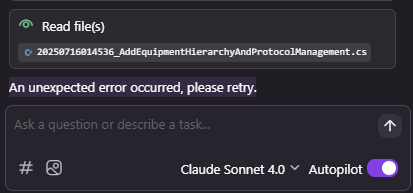
Kiro Unexpected Error Explained: If you’re using Kiro IDE Amazon’s AI-powered coding environment and encountering the frustrating message:
“An unexpected error occurred, please retry”
don’t worry! You’re not alone, this error has become one of the most commonly reported issues for users. The guide will explain the error to you while providing reasons for its existence and testing results which show actual user and developer solutions.
Kiro Unexpected Error Explained: What Does the Error Mean?
The Kiro system displays an error message which shows “An unexpected error occurred, please retry” to indicate that a problem exists but the system has not revealed its details to users. The system sends this message to users whenever an unexpected event happens which disrupts the standard processing of their request.
The situation could happen because of these factors:
- The AI models experience server timeouts and service overloads when users create high demand.
- The system faces problems because of network interruptions and users who experience unstable internet or VPN connections.
- The system encounters problems because of corrupted cache data and users who have existing app sessions running.
- Malformed requests occur when users attempt to use external tools or plugins to access system resources.
Discussion forum users report that this error happens for them during extended periods of work or when they read extensive project documents or when the IDE needs to retrieve account details and handle complex tasks.
Common Causes
The situation needs analysis because the discovered root cause serves as the solution for preventing future occurrences.
1. Server or Network Issues
The Kiro backend services which support its AI agents (Claude and Sonnet) experience accessibility problems because of outdated service connections. The system will display errors to users who maintain a stable Wi-Fi connection.
The error detection process starts when the system fails to complete any operation. The user needs to verify their internet connection before attempting the process again.
2. Corrupted or Large Session Context
Kiro operates by maintaining user conversation records which include current context information and conversation history. The system will stop functioning when the stored data reaches excessive size or develops operational problems.
The error will occur when users attempt to conduct extensive dialogues or execute demanding operations.
3. Outdated Application Version
Kiro requires users to install all current application updates because outdated software will create compatibility problems with the latest version.
4. Connected Tools or Extensions
The integration of third-party applications (which include GitHub and external plugins and MCP servers) leads to conflicts with the IDE. This results in both malformed requests and session resets.
5. Local Cache / Corrupt Files
The system experiences setting corruption on local devices because of update processes and sudden shutdowns and system crashes.
How To Fix Kiro Unexpected Error?
The following method provides a structured approach to solve your present issue.
Conduct an intelligent retry of the process.
Users should click the message again or press Enter to retry their action because it sometimes succeeds on the second attempt.
Users should tell Kiro to proceed with their work instead of making them start over again because this solution sometimes works according to users.
- Open a New Session / Restart
- The crash occurred during your session.
- You need to close your existing chat and project work.
- You should start a new chat or leave this window to begin a new session.
- Please test your prompt once more.
This process effectively removes all stored data which had developed faults.
Update Kiro to its most recent software version.
On a Mac computer you can access Kiro updates through the Kiro menu by selecting Check for Updates.
Windows users should restart their application to receive a notification.
You need to update your software because people who used older versions faced more issues.
Disable Connected Tools / Extensions
Your system requires external tools and MCP connections to function correctly.
1. Go to Settings > MCP Servers
2. Toggle them OFF temporarily
3. Retry your prompt
When this solution resolves your problem it indicates that one specific tool created the operational issue.
Kiro is counting the errored requests too
byu/26th_Official inkiroIDE
You must log out and then log back into your account.
Authentication tokens can expire
1. Click your Profile
2. Select Sign Out
3. Restart Kiro
4. Log in again
This process creates new authentication credentials while it eliminates all expired session information.
Nuclear Option: Clear Cache (Advanced Users)
On Mac: Copy code
Sh
rm -rf ~/Library/Application\ Support/Kiro
On Windows:
Delete %APPDATA%\Kiro folder
Only use this if nothing else fixes the issue.
Claude Code Overloaded Error: Why It Happens and How to Fix it?
When the Problem Isn’t on Your Side?
The problem arises from Kiro servers or the AI backend when local systems fail to operate correctly. The following steps need to be performed:
1. The official Kiro Discord and GitHub issues should be checked.
2. The user should look for information about recent outage.
3. The user should wait for some time before attempting to access the system again.
4. The platform experiences multiple errors because server load spikes which affect many users.
The following expert recommendations will help organizations avoid similar incidents in the future:
- The following actions will help you maintain a secure system which will protect your data from unauthorized access.
- Keep your Kiro version updated users need to avoid creating excessive conversation contexts which will destroy their ongoing dialogues.
- The user needs to maintain their internet connection without any interruptions while using a stable VPN connection.
The user should analyze logs to find all existing error patterns.
The user should report bugs through official channels only.